AtroCore offers highly flexible, scalable and configurable mechanisms that enable customers to manage and use their data efficiently without being tied to rigid structures. You have the opportunity to create your own data structure on your environment according to your own needs. This is what the Entity Manager is for. It allows you to create and delete new entities (tables) and relationships between them, add fields to entities, and configure entity parameters.
Entity configuration
To manage entities, go to Administration / Entities. Here you can create new entities and configure existing ones.
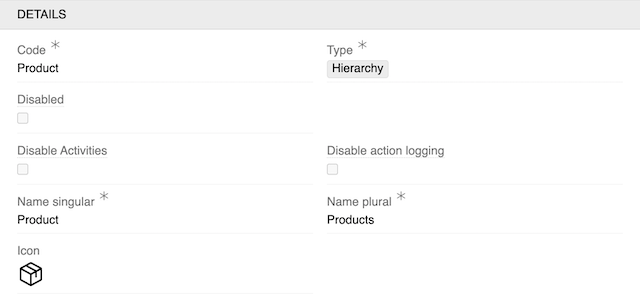
For an entity, the following record actions are available: Delete (available only for custom entities) and Duplicate. When an entity is duplicated, all of its fields are copied as well, except for fields of the Multiple Link type.
Required fields
The following fields must be filled when creating an entity:
| Field Name | Description |
|---|---|
| Type | Type of the entity. Base, Hierarchy, Archive and Reference types are available for entities |
| Code | Entity name |
| Name Singular | Singular name of the entity that will be displayed in the interface |
| Name Plural | The name of the entity in the plural that will be displayed in the interface |
Code and Type cannot be changed after entity creation.
For detailed information about entity types and their capabilities, see Entity Types.
Configuration fields
After creating an entity, you can configure the following fields in the Details panel:
| Field Name | Description |
|---|---|
| Disabled | This option makes the entity unavailable for editing. When it is activated, the entity is available only in view mode |
| Disable Activities | Disable activity tracking for this entity |
| Disable action logging | Disable action logging for this entity |
| Icon | Icon to be displayed before the entity name in the navigation menu and favorites. If not set, the first letter of the entity name is used. See User interface for how to enable or disable this. |
| Archivable | Enable this option to be able to archive entity records (the "Archive" field of the Boolean type is automatically added) |
| Activable | This property allows you to activate and deactivate entity records (the "Active" field of the Boolean type is automatically added) |
| Default order field | A field by which records are sorted in the list view. By default records are sorted by ID |
| Default order direction | Order of sorting, possible options: Ascending, Descending (by default) |
| Status field | Updates of this field are logged in stream |
| Delete without confirmation | If checked, the individual record is deleted without user confirmation. Deletion of multiple records is still to be confirmed |
| Permanent deletion period, days | Records for this entity are permanently deleted XX days after the deletion date. This field is not used in Relation entity type. See Scheduled Jobs for details. |
| Auto-delete period, in days | Records that exist longer than the specified period will be deleted from the system. This field is used in Archive entity type. See Scheduled Jobs for details. |
| Relations effecting modification date/time | Changes in these relations will cause the update of "Modified At" date and time |
| Duplicatable relations | Select the relationships that should be duplicated when duplicating an entity |
| Hide field type filters | Hide field type filters in the interface |
| Text Filter fields | If left empty, all text fields will be used for searching records in list views and global search. If specified, only the selected fields will be searchable for this entity. |
| Non Comparable Fields | Fields that should not be used for comparison |
| Quick Actions | Select actions to display as icon shortcuts directly next to the three-dot button in list rows. Configured quick actions allow users to trigger the most common operations without opening the dropdown menu. Available options: View, Edit, Remove. For more information, see Quick Actions. |
| No record activity logging for fields | Disable activity logging for specific fields |
| Log record activity for relations | Enable activity logging for specific relations |
| Has Attributes | Enable attributes for this entity |
| Has Associates | Enable associations for this entity |
| Has Classifications | Enable Classifications for this entity. See Classifications for the additional options this unlocks. |
| Disable direct attribute linking | When enabled, attributes can only be added to records via classification and not manually. Only shown when Has Classifications is enabled. See Classifications |
| Link Attributes with the Classification automatically | When an attribute is directly linked to a record that is already assigned to a Classification, it is also automatically added to that Classification. Only available when Has Attributes is enabled and Disable direct attribute linking is disabled. See Classifications for details. |
| Single Classification only | When enabled, only one classification can be added to record. See Classifications |
Access Management panel
In this panel, you configure access control settings for the entity:
| Field Name | Description |
|---|---|
| Enable Owner | Enable owner-based access control for this entity |
| Enable Assigned User | Enable assigned user-based access control for this entity |
| Enable Teams | Enable team-based access control for this entity |
Hierarchy Management panel
For Hierarchy type entities, an additional panel is available:
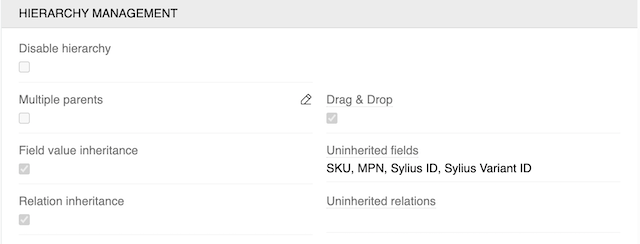
See Hierarchy Entity Type for details.
Fields panel
The Fields panel allows you to add and configure fields for the entity.
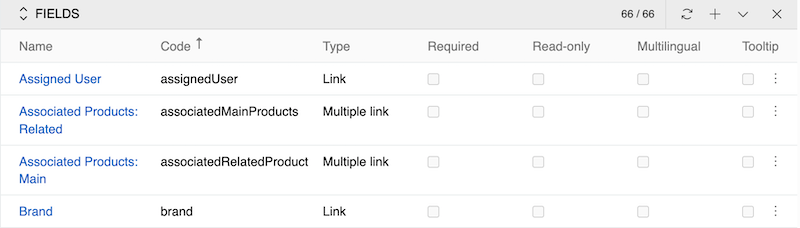
For detailed information about field types, configuration, and management, see Fields and Attributes.
Unique Indexes panel
The Unique Indexes panel is available for Base and Hierarchy entities. It lists the unique indexes of the entity and lets you create your own.
A unique index enforces the uniqueness of a combination of values: no two records of the entity may hold the same set of values in the selected fields. To make a single field unique, use the Unique option of that field instead — see Data Types.
Creating a unique index
| Field Name | Description |
|---|---|
| Name | Identifier of the index. It is filled in automatically from the selected fields (unique_sku_brand) and can be adjusted. Lowercase Latin letters, digits and underscores are allowed. The name must be unique within the entity and cannot be changed afterwards |
| Fields | The fields the index consists of. At least two fields are required |
| Entity | The entity the index belongs to |
The following field types can be part of a unique index: Boolean, String, Integer, Float, List, Link, File, Date, Date-time, Email, URL and Language Code. The record ID is not offered, because it is unique on its own.
The index name is what the database reports when the index is violated, so give it a name that identifies the rule.
Behavior
- The index is created in the database as soon as the record is saved. If the entity already contains records that violate it, the index is not created and the conflicting values are listed in the error message.
- Soft-deleted records are indexed separately from active ones, so a deleted record never blocks the creation of a new record with the same values.
- A field that is part of a unique index cannot be deleted. Delete the index first.
- Unique indexes shipped with AtroCore and its modules are listed in the panel as well, but cannot be edited or deleted.
Attributes panel
The Attributes panel allows you to add and configure attributes for the entity.
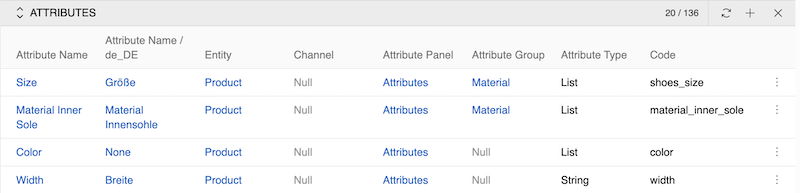
For detailed information about attribute types and configuration, see Fields and Attributes.
Navigating entities and fields
The left sidebar provides a tree for moving between entities and their fields without returning to the list.
On an entity page the tree lists all entities. On a field page it lists the fields of the entity the field belongs to, so you can step from one field to another directly. In both cases the record you are viewing is highlighted in the tree, and the search box above it filters the tree by name.
Breadcrumbs on a field page show the path Entities / Entity Name / Field Name, where each part is a link.
Fields are always opened in the context of their entity – from the Fields panel or from the tree. A standalone list of all fields is not available.
Working with entity records
For information about creating, editing, and deleting records within entities, see the Record Management documentation.