Attribute Panels provide an additional layer of structure for displaying attribute values on a record's detail page. Each panel appears as a separate section and groups its attributes by Attribute Group.
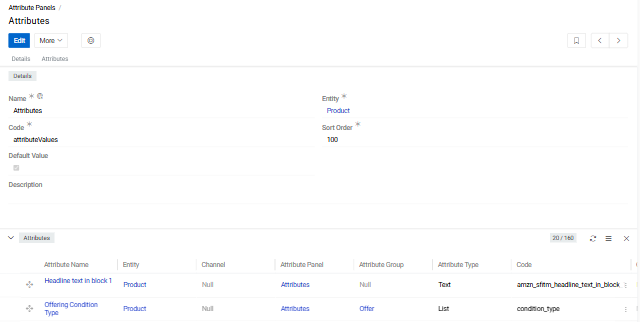
An Attribute Panel is required for every attribute. Attribute Groups are optional and can also be assigned at the individual attribute level.
When attributes are enabled for an entity, a default Attributes panel is created automatically. This panel can be selected when creating an attribute. Additional custom panels can be created as needed to organise attributes into separate sections.
Attribute Panels are accessible from the Navigation Menu.
Creating an Attribute Panel
You can create a panel directly when creating an attribute by clicking + next to the Attribute Panel field. Alternatively, navigate to Attribute Panels in the navigation menu and click Create.
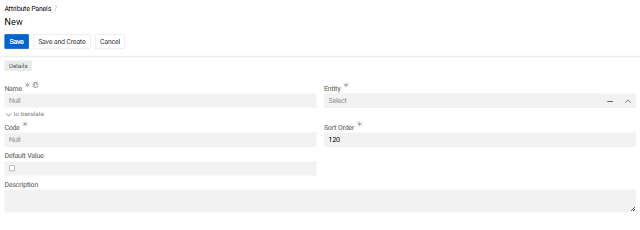
- Name — Display name, available in multiple languages
- Code — Unique identifier
- Entity — The entity whose attributes this panel will organize
- Sort Order — Controls the order of panels on the entity record detail view (ascending)
- Default — When checked, this panel is pre-selected as the default for new attributes
- Description — Optional notes
After saving, the panel's detail view shows all attributes assigned to it, grouped by their Attribute Group.
Adding Attributes to a Panel

On the Attribute Panel detail view, open the menu icon in the Attributes panel header:
- Show List — opens the full attribute list view filtered to this panel
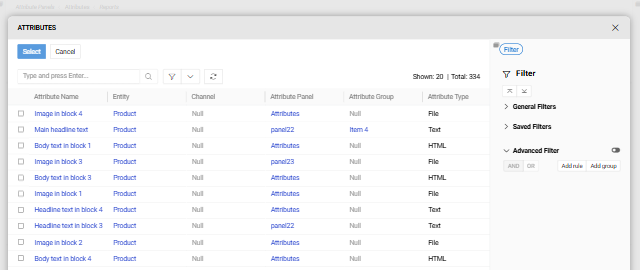
- Select — opens a selection dialog where you can choose one or more existing attributes; use the right sidebar to filter the results
To manage an individual attribute, click the three-dot menu on its row:
- View — opens the attribute's detail view
- Edit — opens the attribute for editing
- Delete — deletes the attribute
Displaying Attribute Panels on a Record Detail View
An Attribute Panel appears on a record's detail view only when at least one attribute assigned to that panel has been added to the record. Panels with no attributes on the record are not shown.
The order in which panels appear is determined solely by the Sort Order field on each panel.
The order of attributes within the Classification Attributes panel on a Classification record can be adjusted by drag-and-drop. This order takes priority over the sort order defined on the attribute itself.